How to count calories from a photo
Take the photo in good light at about 45 degrees with the whole plate in frame, then check the dish name and portion and add any oil or sauce before you log it. A photo gives an estimate; those checks are what make it a good one.
Eight steps to a better estimate
- Use good light. Daylight or a bright room. Shadows hide edges, and the model judges portion size from edges.
- Get the whole plate in frame. Include the rim of the plate or bowl. Its size is the scale everything else is measured against.
- Shoot at about 45 degrees. Straight down hides how deep a bowl is; side-on hides what is on the plate. An angle shows both.
- Keep items apart. Rice next to the ulam, not under it. CalOff returns separate rows for separate foods, so give it separate foods to see.
- Check the name. If the dish is wrong, type what it is. In CalOff the nutrition follows the corrected name through the food database.
- Check the portion. A cup of cooked rice is about 200 g; a palm-sized piece of meat about 100 g. Adjust the slider if the guess is off.
- Add what the camera cannot see. Cooking oil is about 120 kcal a tablespoon. Sauce, dressing, butter, sugar in coffee: add them as their own items.
- Scan the label for packaged food. A printed nutrition panel beats any estimate. Point the camera at it, or scan the barcode.
Why photo estimates miss
- A photo is flat. Depth has to be inferred, so a deep bowl and a shallow one can look alike from above.
- Fat hides. Oil soaks in, coconut milk looks like broth, butter melts. These are the most calorie-dense things on a plate and the hardest to see.
- Mixed dishes. Fried rice, pancit and stews are many ingredients in unknown amounts.
- Unfamiliar food. A model that never learned a dish calls it something generic: "soup" instead of sinigang. CalOff's model was chosen partly because it knows Filipino dishes by name.
How it works in CalOff
- Tap Scan and photograph the meal, or pick a photo you already took.
- The model on your iPhone names each food and estimates the portion. Nothing is uploaded.
- Review: rename, adjust the portion, and say yes to Anything added? for sauce, oil or rice.
- Log it. Next time, the same meal is one tap away under Log again.
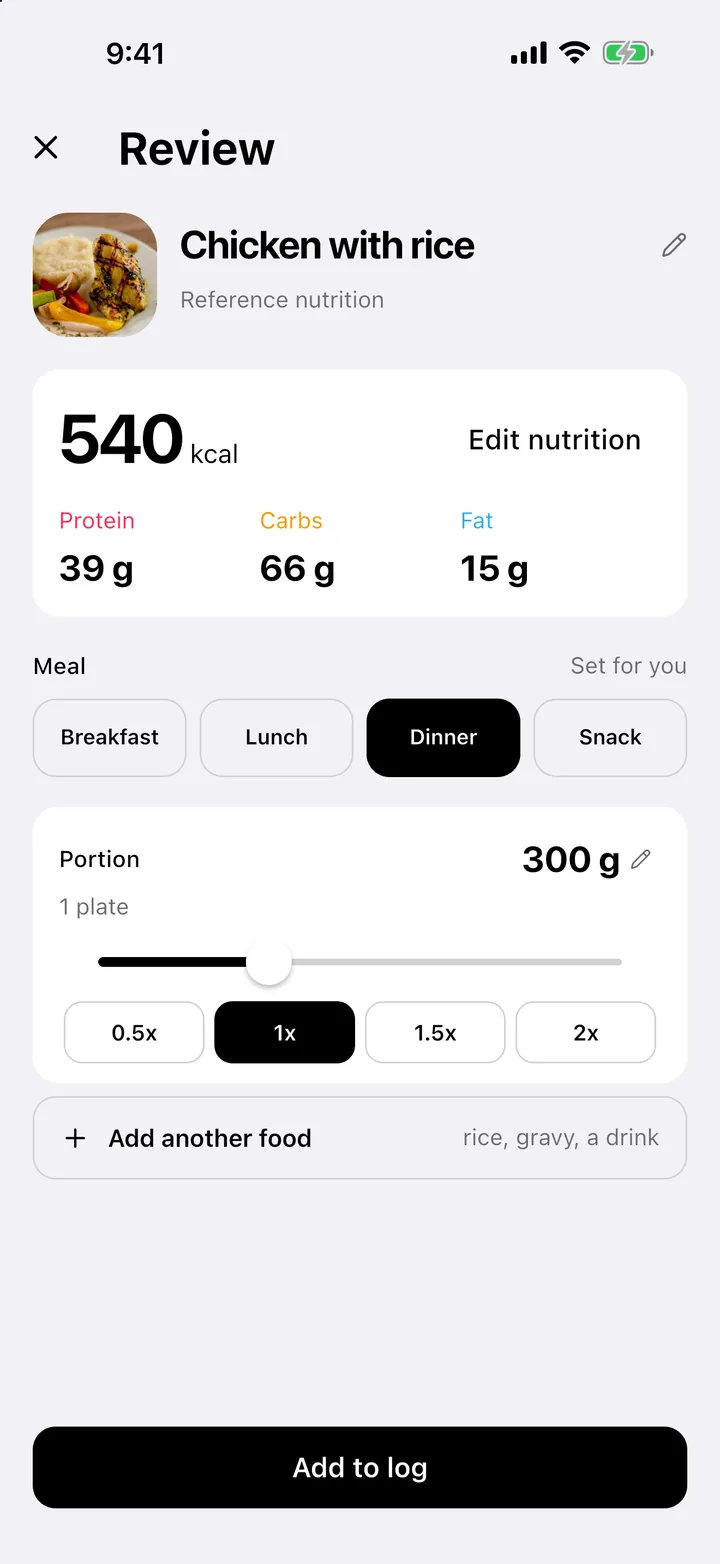
The review screen shows calories first, then protein, carbs and fat, with the meal and portion underneath. Everything is editable before it is saved, and what you correct is remembered.
Questions
Can AI count calories from a picture?
Yes, as an estimate. A vision model names the food, estimates the portion from the plate and what surrounds it, and looks up the nutrition. It cannot see oil, sugar or what is under the rice, so a quick review before logging is what makes the number useful.
How accurate are photo calorie counters?
Close enough to track a trend when you check the dish name and portion, and further off when a meal hides its fat: fried food, coconut milk, creamy sauces. Accuracy also varies by cuisine; a model that has not learned a dish will call it something generic. Correcting a scan in CalOff teaches it your version next time.
Which app counts calories from a photo offline?
CalOff for iPhone runs its food recognition on the phone, so photo calorie counting works in airplane mode after a one-time 728 MB download.
More from CalOff
- Calorie calculatorYour daily calories and macros, the maths CalOff uses
- TDEE calculatorHow many calories you burn in a day
- Macro calculatorProtein, carbs and fat in grams for your goal
- Filipino food calories139 dishes, per serving: adobo, sinigang, silog and more
- Filipino meal plans1,200, 1,500 and 1,800 calories, rice included
- Offline calorie counterWhat works with no signal, and the one download it needs
- Calorie apps comparedSeven apps, by what their privacy labels declare
- Cal AI alternativeCalOff and Cal AI, side by side
- MyFitnessPal alternativeCalOff and MyFitnessPal, side by side
- Lose It! alternativeCalOff and Lose It!, side by side